



HTML method 语法
在 HTML 中,method 属性用于指定表单提交时所采用的 HTTP 请求方法。其中,只有 form 元素支持 method 属性。
语法:
<form method="请求方式">
    <!-- 表单内容 -->
</form>
说明:
method 属性有以下 3 种取值。
1. get(默认值)
当取值为 “get” 时,表单数据会以 “键=值” 的形式,拼接在 URL 的末尾,并用 ? 分隔。这种方式适合用于提交少量的、非敏感数据,比如搜索关键词。
get 方式存在以下缺点:
- 受 URL 长度限制,不能提交大量数据。
- 数据会暴露在地址栏,不适合提交用户名、密码等敏感信息。
比如在下面代码中,提交后 URL 可能变成:/search?q= 关键字。
<form method="get" action="/search">
    <input name="q" type="text">
    <button type="submit">搜索</button>
</form>
2. post
当取值为 “post” 时,表单数据不会附加到 URL,而是作为请求的 “主体(body)” 发送到服务器。这种方式相对更隐蔽(数据不显示在地址栏、不会被浏览器历史记录保存),适合提交敏感数据。
需要注意的是,上传文件时必须使用 post,并结合 enctype="multipart/form-data"。
示例:
<form method="post" action="/submit">
    <input name="username" type="text">
    <input name="password" type="password">
    <button type="submit">登录</button>
</form>
注意: 如果想要真正保证传输安全,必须使用 HTTPS 协议。
3. dialog(不常见,适用于 dialog 元素)
当 action 属性指向某个 dialog 元素的 ID 时,表单不会向服务器发出请求,提交表单则会自动打开或关闭该对话框。这种方式通常用于页面内部的弹出框交互,而不是数据提交。
示例:
<dialog id="myDialog">这是一个弹出框</dialog>
<form method="dialog" action="#myDialog">
    <button type="submit">打开弹窗</button>
</form>
HTML method 摘要
| 适用元素 | form |
|---|---|
| 使用频率 | 高 |
| 兼容性 | 查看 |
| 官方文档 | 查看 |
| MDN | 查看 |
HTML method 示例
接下来,我们将通过几个简单的例子来讲解一下 HTML method 属性是如何使用的。
示例 1:method="get"
<!DOCTYPE html>
<html>
<head>
    <meta charset="utf-8">
    <title></title>
</head>
<body>
    <form action="/search" method="get">
        <p>
            <label>
                搜索关键词:
                <input type="text" name="q" required>
            </label>
        </p>
        <p>
            <button type="submit">搜索</button>
        </p>
    </form>
</body>
</html>页面效果如下图所示。
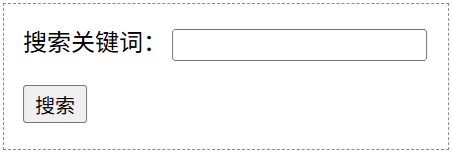
分析:
当我们在搜索框输入 “HTML 教程” 并点击【搜索】按钮之后,浏览器会导航到类似下面这样的 URL:
http://example.com/search?q=HTML%E6%95%99%E7%A8%8B其中,表单数据(q=HTML%E6%95%99%E7%A8%8B)是被附加在 URL 中的,它通过问号与路径分隔。
示例 2:method="post"
<!DOCTYPE html>
<html>
<head>
    <meta charset="utf-8">
    <title></title>
</head>
<body>
    <form action="/login" method="post">
        <p>
            <label>
                账号:
                <input type="text" name="username">
            </label>
        </p>
        <p>
            <label>
                密码:
                <input type="password" name="password">
            </label>
        </p>
        <p>
            <button type="submit">登录</button>
        </p>
    </form>
</body>
</html>页面效果如下图所示。
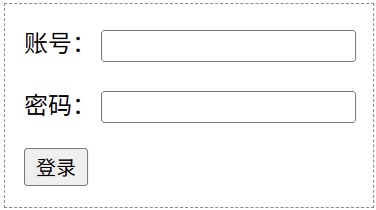
分析:
当我们点击【登录】按钮时,账号和密码数据将作为 HTTP 请求的主体(body)发送到 “/login” 这个路由中。post 方式提高了安全性(数据不会在浏览器地址栏显示),并且允许发送大量数据。
示例 3:method="dialog"
<!DOCTYPE html>
<html>
<head>
    <meta charset="utf-8">
    <title></title>
</head>
<body>
    <p>
        <button id="btn">打开对话框</button>
    </p>
    <dialog id="dialog">
        <h2>用户反馈</h2>
        <form method="dialog">
            <p>
                <label>
                    您的反馈:
                    <textarea name="feedback" rows="4" cols="30"></textarea>
                </label>
            </p>
            <p>
                <button type="submit" value="cancel">取消</button>
                <button type="submit" value="ok">确定</button>
            </p>
        </form>
    </dialog>
    <p id="result">操作结果:</p>

    <script>
        const oBtn = document.getElementById("btn");
        const oDialog = document.getElementById("dialog");
        const oResult = document.getElementById("result");

        oBtn.addEventListener("click", function() {
            oDialog.showModal();
        });

        // 当对话框关闭时,检查返回值
        oDialog.addEventListener("close", () => {
            oResult.textContent = `操作结果:${oDialog.returnValue || '无'}`;
        });
    </script>
</body>
</html>默认情况下,页面效果如下图 1 所示。当点击【打开对话框】之后,页面效果如下图 2 所示。
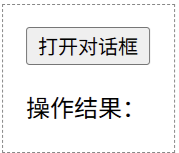
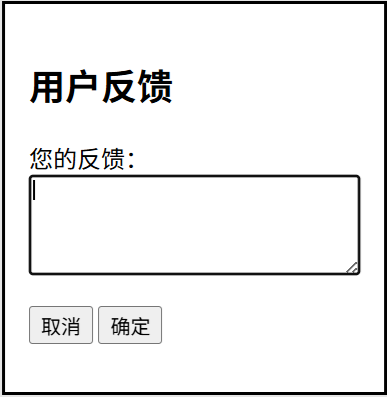
分析:
在这个例子中,我们为 dialog 元素内部的 form 元素设置了 method="dialog"。打开模态对话框之后,点击表单内的 “取消” 或 “确定” 按钮时,对话框会关闭,并且按钮的 value(cancel 或 ok)会成为 dialog 元素的 returnValue。
这个 returnValue 可以通过 JavaScript(监听 close 事件)获取,从而根据用户在对话框中的选择执行相应的客户端逻辑,而不需要向服务器发送请求。
