



在 CSS 中,我们可以使用 font-weight 属性来定义字体的粗细。
语法:
font-weight: 数值或关键字说明:
font-weight 的取值有 2 种。一种是 100、200、…、900 的数值,另一种是 “关键字”。其中关键字取值如下表所示。
| 取值 | 说明 |
|---|---|
| normal(默认值) | 正常 |
| lighter | 较细 |
| bold | 粗体 |
| bolder | 较粗(效果与 bolder 差不多) |
注意: 字体粗细(font-weight)和字体大小(font-size)是不一样的。粗细指的是字体的 “肥瘦”,而大小指的是字体的 “宽高”。
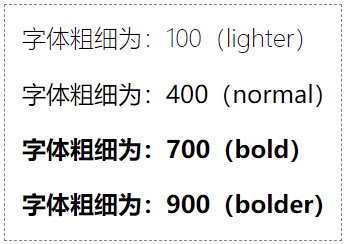
示例 1:font-weight 取值为 100 ~ 900
<!DOCTYPE html>
<html>
<head>
    <meta charset="utf-8">
    <title></title>
    <style>
        p:nth-child(1) { font-weight: 100; }
        p:nth-child(2) { font-weight: 400; }
        p:nth-child(3) { font-weight: 700; }
        p:nth-child(4) { font-weight: 900; }
    </style>
</head>
<body>
    <p>字体粗细为:100(lighter)</p>
    <p>字体粗细为:400(normal)</p>
    <p>字体粗细为:700(bold)</p>
    <p>字体粗细为:900(bolder)</p>
</body>
</html>页面效果如下图所示。
分析:
font-weight 属性可以取 100、200、…、900 这 9 个值。其中 100 相当于 lighter,400 相当于 normal,700 相当于 bold,而 900 相当于 bolder。
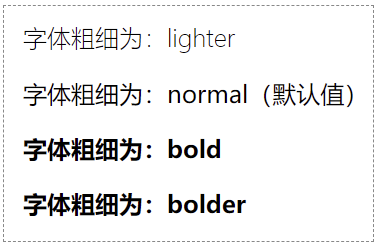
示例 2:font-weight 取值为关键字
<!DOCTYPE html>
<html>
<head>
    <meta charset="utf-8">
    <title></title>
    <style>
        p:nth-child(1) { font-weight: lighter; }
        p:nth-child(2) { font-weight: normal; }
        p:nth-child(3) { font-weight: bold; }
        p:nth-child(4) { font-weight: bolder; }
    </style>
</head>
<body>
    <p>字体粗细为:lighter</p>
    <p>字体粗细为:normal(默认值)</p>
    <p>字体粗细为:bold</p>
    <p>字体粗细为:bolder</p>
</body>
</html>页面效果如下图所示。
分析:
在实际开发中,大多数情况下只会用到 bold 这一个。对于初学的小伙伴,你完全只需要记住 font-weight: bold; 这一个即可。
常见问题
1. 为什么我设置了 font-weight: 100;,字体还是看起来和 font-weight: 400; 一样呢?
如果你电脑上的字体本身不包含这些粗细变体(比如没有设计 100 或 900 的字形),浏览器是渲染不出效果的。实际上,大多数系统默认字体只支持 400 (normal)和 700(bold)。
