



CSS font-weight 语法
在 CSS 中,font-weight 属性用于定义字体的粗细。
语法:
font-weight: 数值或关键字;说明:
font-weight 的取值有 2 种。一种是 100、200、…、900 的数值,另一种是 “关键字”。其中关键字取值如下表所示。
| 取值 | 说明 |
|---|---|
| normal(默认值) | 正常(相当于数值 400) |
| lighter | 较细 |
| bold | 粗体(相当于数值 700) |
| bolder | 较粗 |
其中,lighter 和 bolder 是相对值,取决于父元素的字体粗细以及可用字体的字重。
注意:
- 字体粗细(font-weight)和字体大小(font-size)是不一样的。粗细指的是字体的 “肥瘦”,而大小指的是字体的 “宽高”。
- 如果设置了 font-weight: 700,但引入的字体文件只有 400 的版本,则浏览器会通过算法强行把字描黑,这种效果叫 “伪粗体”,效果一般不如原生粗体好看。
CSS font-weight 摘要
| 属于 | CSS 字体加粗 |
|---|---|
| 使用频率 | 高 |
| 是否继承 | 是 |
| 默认值 | normal(400) |
| 兼容性 | 查看 |
| 官方文档 | 查看 |
| MDN | 查看 |
CSS font-weight 示例
接下来,我们通过几个简单的例子来讲解一下 CSS font-weight 属性是如何使用的。
示例 1:font-weight 取值为 100~900
<!DOCTYPE html>
<html>
<head>
    <meta charset="utf-8">
    <title></title>
    <style>
        p:nth-child(1) { font-weight: 300; }
        p:nth-child(2) { font-weight: 400; }
        p:nth-child(3) { font-weight: 500; }
        p:nth-child(4) { font-weight: 600; }
        p:nth-child(5) { font-weight: 700; }
    </style>
</head>
<body>
    <p>300(细体)</p>
    <p>400(正常)</p>
    <p>500(中等)</p>
    <p>600(半粗)</p>
    <p>700(粗体)</p>
</body>
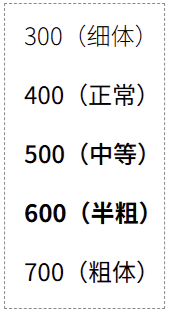
</html>页面效果如下图所示。
分析:
font-weight 属性可以取 100、200、…、900 这 9 个值。在现代网页设计中,为了呈现更细腻的视觉效果,我们经常使用 “数值” 来精确控制 font-weight,例如:
- 300(细体)
- 400(正常)
- 500(中等)
- 600(半粗)
- 700(粗体)
示例 2:font-weight 取值为关键字
<!DOCTYPE html>
<html>
<head>
    <meta charset="utf-8">
    <title></title>
    <style>
        p:nth-child(1) { font-weight: lighter; }
        p:nth-child(2) { font-weight: normal; }
        p:nth-child(3) { font-weight: bold; }
        p:nth-child(4) { font-weight: bolder; }
    </style>
</head>
<body>
    <p>字体粗细为:lighter</p>
    <p>字体粗细为:normal(默认值)</p>
    <p>字体粗细为:bold</p>
    <p>字体粗细为:bolder</p>
</body>
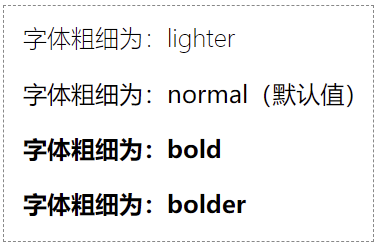
</html>页面效果如下图所示。
分析:
对于初学者,最常用的关键字是 bold。但在进阶开发中,熟练使用数值是必备技能。
