



CSS height 语法
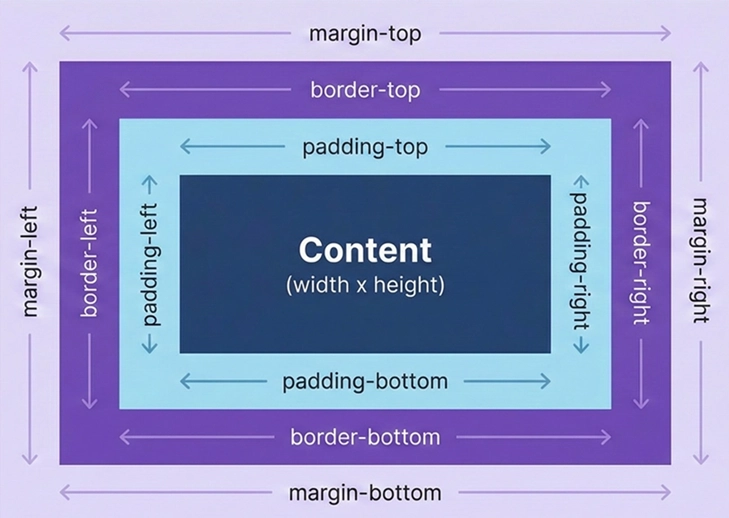
在 CSS 中,height 属性用于定义元素的高度。从下图所示的 CSS 盒子模型中可以看出,height 是针对内容区而言的。
语法:
height: 取值;说明:
height 的取值主要分为以下 2 种:
- 关键字:auto(默认值,由内容自动撑开高度)、fit-content 等。
- 数值:px、%、rem、vh 等。
对于 height 属性,小伙伴们要清楚以下几点。
- 如果 height 的值小于 min-height 的值,那么 min-height 的值会覆盖 height 的值(即此时 height 的值为 min-height 的值)。
- 如果 height 的值大于 max-height 的值,那么 max-height 的值会覆盖 height 的值(即此时 height 的值为 max-height 的值)。
- inline 元素(如 span、strong 等)设置 width 和 height 是无效的,需要使用 display 属性将其转换为 block 或 inline-block 才会生效。
CSS height 摘要
| 属于 | CSS 盒子模型 |
|---|---|
| 使用频率 | 高 |
| 是否继承 | 否 |
| 默认值 | auto |
| 兼容性 | 查看 |
| 官方文档 | 查看 |
| MDN | 查看 |
CSS height 示例
接下来,我们通过几个简单的例子来讲解一下 CSS height 属性是如何使用的。
示例 1:height 基本用法
<!DOCTYPE html>
<html>
<head>
    <meta charset="utf-8">
    <title></title>
    <style>
        div {
            width: 100px;
            margin-bottom: 10px;
            background-color: skyblue;
        }
        div:nth-of-type(1) { height: 100px; }
        div:nth-of-type(2) { height: 10rem; }
    </style>
</head>
<body>
    <div></div>
    <div></div>
</body>
</html>页面效果如下图所示。

示例 2:height 值为百分比时无法生效
<!DOCTYPE html>
<html>
<head>
    <meta charset="utf-8">
    <title></title>
    <style>
        div {
            width: 100px;
            height: 30%;
            margin-bottom: 10px;
            background-color: skyblue;
        }
    </style>
</head>
<body>
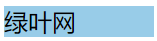
    <div>绿叶网</div>
</body>
</html>页面效果如下图所示。
分析:
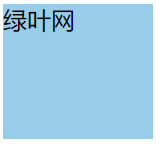
当 height 取值为百分比时,需要其父元素显式定义了 height,这样才会生效。对于上面例子来说,div 的父元素是 body,如果给 body 添加 height,也就是使用下面代码,此时页面效果如下图所示。
body { height: 300px; }
示例 3:无法为 inline 元素设置 height
<!DOCTYPE html>
<html>
<head>
    <meta charset="utf-8">
    <title></title>
    <style>
        span {
            width: 100px;
            margin-bottom: 10px;
            background-color: skyblue;
        }
        span:nth-of-type(1) { height: 100px; }
        span:nth-of-type(2) { height: 10rem; }
        span:nth-of-type(3) { height: 20%; }
    </style>
</head>
<body>
    <span>绿叶网</span>
    <span>绿叶网</span>
    <span>绿叶网</span>
</body>
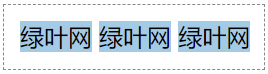
</html>页面效果如下图所示。
分析:
对于 inline 元素(如 span、strong、em 等)来说,我们是无法为其设置 width 和 height 的。
CSS 与尺寸相关的属性
在 CSS 中,与尺寸相关的属性有很多,常用的如下表所示。
| 属性 | 说明 |
|---|---|
| width | 定义元素的宽度 |
| height | 定义元素的高度 |
| max-width | 定义元素的最大宽度,防止其超过此值 |
| max-height | 定义元素的最大高度,防止其超过此值 |
| min-width | 定义元素的最小宽度,确保其不小于此值 |
| min-height | 定义元素的最小高度,确保其不小于此值 |
