



CSS text-decoration-style 语法
在 CSS 中,text-decoration-style 是 text-decoration 的子属性,它用于定义元素内文本装饰性的风格。
语法:
text-decoration-style: 关键字;说明:
text-decoration-style 的取值是关键字,常用取值如下表所示。
| 取值 | 说明 |
|---|---|
| solid(默认值) | 实线 |
| dashed | 虚线 |
| dotted | 点线 |
| wavy | 波浪线 |
| double | 双实线 |
注意: text-decoration-style 属性只有当 text-decoration-line 属性的值不是 none 时才会生效。
CSS text-decoration-style 摘要
| 属于 | CSS 划线 |
|---|---|
| 使用频率 | 低 |
| 是否继承 | 否 |
| 默认值 | solid |
| 兼容性 | 查看 |
| 官方文档 | 查看 |
| MDN | 查看 |
CSS text-decoration-style 示例
接下来,我们通过一个简单的例子来讲解一下 CSS text-decoration-style 属性是如何使用的。
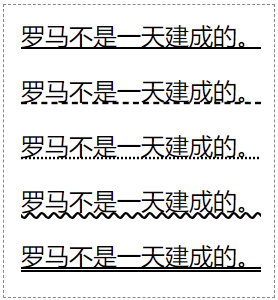
示例 1:text-decoration-style 基本用法
<!DOCTYPE html>
<html>
<head>
    <meta charset="utf-8">
    <title></title>
    <style>
        p { text-decoration: underline; }
        p:nth-child(1) { text-decoration-style: solid; }
        p:nth-child(2) { text-decoration-style: dashed; }
        p:nth-child(3) { text-decoration-style: dotted; }
        p:nth-child(4) { text-decoration-style: wavy; }
        p:nth-child(5) { text-decoration-style: double; }
    </style>
</head>
<body>
    <p>罗马不是一天建成的。</p>
    <p>罗马不是一天建成的。</p>
    <p>罗马不是一天建成的。</p>
    <p>罗马不是一天建成的。</p>
    <p>罗马不是一天建成的。</p>
</body>
</html>页面效果如下图所示。
text-decoration 相关子属性
text-decoration 实际上是一个复合属性,相当于以下 4 个 CSS 属性的简写。
| 子属性 | 说明 |
|---|---|
| text-decoration-line | 定义装饰类型,如 underline、line-through 等,默认值为 none。 |
| text-decoration-style | 定义线条样式,如 "solid"、"dashed"、"wavy",默认值为 "solid"。 |
| text-decoration-color | 定义装饰颜色,如 "red"、"#FFFFFF" 等,默认值为 currentcolor。 |
| text-decoration-thickness | 定义线条粗细,默认值为 auto。 |
示例 2:text-decoration 复合属性
<!DOCTYPE html>
<html>
<head>
    <meta charset="utf-8">
    <title></title>
    <style>
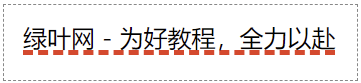
        p { text-decoration: underline dashed red 3px; }
    </style>
</head>
<body>
    <p>绿叶网 - 为好教程,全力以赴</p>
</body>
</html>页面效果如下图所示。
分析:
text-decoration: underline dashed red 3px;上面代码等价于:
text-decoration-line: underline;
text-decoration-style: dashed;
text-decoration-color: red;
text-decoration-thickness: 3px;
在使用 text-decoration,如果你没有显式定义某个子属性值,则表示使用该子属性的默认值。比如 text-decoration: underline;,其实等价于:
text-decoration-line: underline;
text-decoration-style: solid;
text-decoration-color: currentcolor;
text-decoration-thickness: auto;