



CSS animation-play-state 语法
在 CSS 中,animation-play-state 属性用于定义动画的播放状态。
语法:
animation-play-state: 关键字;说明:
animation-play-state 的取值是一个关键字,如下表所示。
| 取值 | 说明 |
|---|---|
| running(默认值) | 播放动画 |
| paused | 暂停动画 |
如果动画之前被暂停,改为 running 会使其从暂停时的位置继续播放。
注意:
- animation-play-state 属性适用于所有元素,包括伪元素(比如 ::before 和 ::after)。
- 改变 animation-play-state 不会重置动画的进度。当从 paused 切换到 running 时,动画会从停止时的那个点继续播放。
CSS animation-play-state 摘要
| 属于 | CSS 动画 |
|---|---|
| 使用频率 | 中 |
| 是否继承 | 否 |
| 默认值 | running |
| 兼容性 | 查看 |
| 官方文档 | 查看 |
| MDN | 查看 |
CSS animation-play-state 示例
接下来,我们通过一个简单的例子来讲解一下 animation-play-state 属性是如何使用的。
示例:animation-play-state 基本用法
<!DOCTYPE html>
<html>
<head>
    <meta charset="utf-8">
    <title></title>
    <style>
        @keyframes mytranslate {
            0% {}
            50% { transform: translateX(160px); }
            100% {}
        }
        #ball {
            width: 40px;
            height: 40px;
            border-radius: 20px;
            background-color: red;
            animation-name: mytranslate;
            animation-timing-function: linear;
            animation-duration: 2s;
            animation-iteration-count: infinite;
        }
        #container {
            display: inline-block;
            width: 200px;
            border: 1px solid silver;
        }
        .controls {
            margin-top: 10px;
        }
    </style>
</head>
<body>
    <div id="container">
        <div id="ball"></div>
    </div>
    <div class="controls">
        <button id="btn-pause" type="button">暂停</button>
        <button id="btn-run" type="button">播放</button>
    </div>
    <script>
        const oBall = document.getElementById("ball");
        const oBtnPause = document.getElementById("btn-pause");
        const oBtnRun = document.getElementById("btn-run");

        // 暂停
        oBtnPause.addEventListener("click", function() {
            oBall.style.animationPlayState = "paused";
        });

        // 播放
        oBtnRun.addEventListener("click", function() {
            oBall.style.animationPlayState = "running";
        });
    </script>
</body>
</html>页面效果如下图所示。
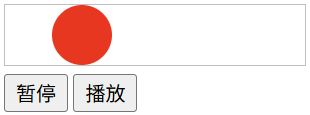
分析:
在这个例子中,我们使用 JavaScript 做了一个小小的程序。当点击【暂停】按钮时,动画会暂停;当点击【播放】按钮时,动画会继续播放。
animation 是一个复合属性
在 CSS 中,animation 是一个复合属性,它包含以下子属性(如下表所示)。
| 子属性 | 说明 |
|---|---|
| animation-name | 定义要应用的动画名称 |
| animation-duration | 定义动画的持续时间 |
| animation-timing-function | 定义动画的速度曲线 |
| animation-delay | 定义动画的延迟时间 |
| animation-iteration-count | 定义动画的重复次数 |
| animation-direction | 定义动画的方向 |
| animation-play-state | 定义动画的播放状态(运行或暂停) |
| animation-fill-mode | 定义动画在播放之前和之后如何应用样式到元素 |
