



CSS outline-style 语法
在 CSS 中,outline-style 属性用于单独定义轮廓线的样式(线条外观)。outline-style 一般搭配以下 2 个属性一起使用。
语法:
outline-style: 关键字;说明:
outline-style 属性的取值如下表所示,常用的只有 solid 这一个。
| 取值 | 说明 |
|---|---|
| none(默认值) | 隐藏 |
| hidden | 隐藏 |
| solid | 实线 |
| dashed | 虚线 |
| dotted | 点线 |
| double | 双实线 |
| groove | 具有雕刻外观的边框,与 ridge 相反 |
| ridge | 具有拉伸外观的边框,与 groove 相反 |
| inset | 元素显示为嵌入的边框,与 outset 相反 |
| outset | 元素显示为浮雕的边框,与 inset 相反 |
| auto | 允许浏览器渲染一个自定义的轮廓样式 |
提示: outline-style 的取值与 border-style 的取值是一样的,小伙伴们可以对比理解。
CSS outline-style 摘要
| 属于 | CSS 用户界面属性 |
|---|---|
| 使用频率 | 低 |
| 是否继承 | 否 |
| 默认值 | none |
| 兼容性 | 查看 |
| 官方文档 | 查看 |
| MDN | 查看 |
CSS outline-style 示例
接下来,我们通过一个简单的例子来讲解一下 outline-style 属性是如何使用的。
示例:outline-style 基本用法
<!DOCTYPE html>
<html>
<head>
    <meta charset="utf-8">
    <style>
        input {
            outline-width: 4px;
            outline-color: red;
        }
        p:nth-of-type(1) > input { outline-style: solid; }
        p:nth-of-type(2) > input { outline-style: dashed; }
        p:nth-of-type(3) > input { outline-style: dotted; }
        p:nth-of-type(4) > input { outline-style: double; }
        p:nth-of-type(5) > input { outline-style: groove; }
        p:nth-of-type(6) > input { outline-style: ridge; }
        p:nth-of-type(7) > input { outline-style: inset; }
        p:nth-of-type(8) > input { outline-style: outset; }
    </style>
</head>
<body>
    <p><input type="text">(solid)</p>
    <p><input type="text">(dashed)</p>
    <p><input type="text">(dotted)</p>
    <p><input type="text">(double)</p>
    <p><input type="text">(groove)</p>
    <p><input type="text">(ridge)</p>
    <p><input type="text">(inset)</p>
    <p><input type="text">(outset)</p>
</body>
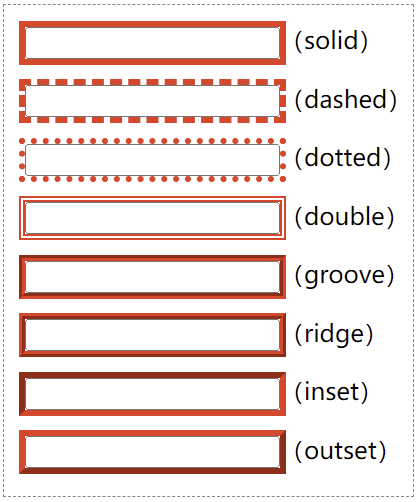
</html>页面效果如下图所示。
outline 是一个复合属性
outline 其实是一个复合属性,它有 3 个子属性(如下表所示)。
| 子属性 | 说明 |
|---|---|
| outline-width | 轮廓线的宽度 |
| outline-style | 轮廓线的样式 |
| outline-color | 轮廓线的颜色 |
