



CSS bottom 语法
在 CSS 中,bottom 属性用于定义已定位元素的底部偏移量。这个属性只有在元素的 position 属性值不是 static 时才会生效。
语法:
bottom: 数值;说明:
bottom 属性取值一般是一个数值,比如 px、em、rem、百分比(%)等。百分比值通常是相对于参考对象的 “高度” 来计算的。
对于 bottom 属性,小伙伴们要清楚以下几点。
- bottom 属性只对 position 属性设置为 relative、absolute、fixed 或 sticky 的元素有效。
- 对于 position: relative; 的元素,bottom 的偏移是相对于元素 “自身” 原本在正常文档流中的位置向上偏移。
- 对于 position: absolute; 的元素,bottom 的偏移是相对于其 “最近的已定位祖先元素” 的内边距盒底部边缘。
- 对于 position: fixed; 的元素,bottom 的偏移是相对于 “视口” 的底部边缘。
当同时设置了 top 和 bottom,浏览器的表现可能会有所不同,取决于元素的高度是否固定:
- 如果是 height: auto(元素高度未设置),浏览器会尝试拉伸元素高度以同时满足 top 和 bottom 的值。
- 如果元素高度已设置,或在某些布局中(如 flex 或 grid),通常是:
- 在从上到下的书写模式下,top 优先级高于 bottom。。
- 但在 position: absolute 或 fixed 且 height: auto 的情况下,top 和 bottom 会共同影响高度。
CSS bottom 摘要
| 属于 | CSS 定位 |
|---|---|
| 使用频率 | 高 |
| 是否继承 | 否 |
| 默认值 | auto |
| 兼容性 | 查看 |
| 官方文档 | 查看 |
| MDN | 查看 |
CSS bottom 示例
接下来,我们通过一个简单的例子来讲解一下 bottom 属性是如何使用的。
示例:bottom 基本用法
<!DOCTYPE html>
<html>
<head>
    <meta charset="utf-8">
    <title></title>
    <style>
        .parent {
            position: relative;
            width: 200px;
            height: 200px;
            background-color: lightskyblue;
        }
        .child {
            position: absolute;
            bottom: 30px;
            width: 50px;
            height: 50px;
            background-color: hotpink;
        }
    </style>
</head>
<body>
    <div class="parent">
        <div class="child"></div>
    </div>
</body>
</html>页面效果如下图所示。
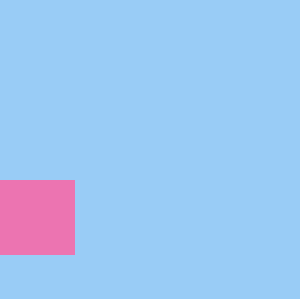
分析:
在这个例子中,由于我们给父元素设置了 position: relative;,此时子元素的 position: absolute; 是相对于父元素来说的。bottom: 30px; 表示定义子元素距离父元素底部距离为 30px。
