



在 HTML 中,复选框(checkbox)是一种输入控件,它允许用户从一组选项中选择多个。复选框通常用于收集用户的兴趣、喜好等信息。
提示: 单选按钮只能从一组选项中选择一个,而复选框可以从一组选项中选择多个。
HTML 复选框语法
在 HTML 中,复选框也是使用 input 标签来实现的,其中 type 属性取值为 "checkbox"。
语法:
<input type="checkbox" name="组名" value="值">说明:
对于复选框来说,它常用的属性如下表所示。
| 属性 | 说明 |
|---|---|
| name | 单选按钮所在的组名 |
| value | 单选按钮的值 |
| checked | 设置单选按钮的初始选中状态 |
| disabled | 设置单选按钮是否 “禁用” |
与单选按钮一样,复选框同样也是没有 readonly 属性的。如果想要禁止用户修改(即 “勾选” 或 “取消勾选”),我们只能使用 disabled 属性来实现。
很多初学的小伙伴,编写复选框代码是这样的:
<input type="checkbox" name="fruit" value="苹果"/>苹果这种写法的用户体验是非常糟糕的,因为我们很难精准地点中复选框本身(尤其是在手机端上)。最标准的写法是:每一个复选框,都使用一个 label 标签包裹住,这样可以使得我们点击文字也能选中。
<!--强烈推荐-->
<label><input type="checkbox" name="fruit" value="苹果"/>苹果</label>
提示: 不管是单选按钮,还是复选框,我们都应该配合 label 标签来使用,这样可以大大提高用户体验。
HTML 复选框示例
接下来,我们通过几个简单的例子来讲解一下 HTML 复选框是如何使用的。
示例 1:HTML 创建复选框
<!DOCTYPE html>
<html>
<head>
    <meta charset="utf-8">
    <title></title>
</head>
<body>
    <form method="post" action="/">
        你喜欢的水果:<br>
        <label><input type="checkbox" name="fruit" value="apple"/>苹果</label>
        <label><input type="checkbox" name="fruit" value="banana"/>香蕉</label>
        <label><input type="checkbox" name="fruit" value="grape"/>葡萄</label>
        <label><input type="checkbox" name="fruit" value="orange"/>橘子</label>
    </form>
</body>
</html>页面效果如下图所示。
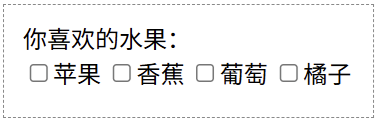
分析:
复选框中的 name 跟单选按钮中的 name 都是用来设置 “组名” 的,表示该选项位于哪一组中。
两者都设置 name 属性,为什么单选按钮只能选中一项,而复选框可以选择多项呢?这是因为浏览器会自动识别这是 “单选按钮组” 还是 “复选框组”(说白了就是根据 type 属性取值来识别)。如果是单选按钮组,就只能选择一项;如果是复选框组,就可以选择多项。
此外,虽然 HTML 允许 value 的值为中文,但在实际开发中,后端通常期望收到英文或数字代码(如 value="apple" 或 value="1")。
<!--推荐-->
<label><input type="checkbox" name="fruit" value="apple"/>苹果</label>
<label><input type="checkbox" name="fruit" value="banana"/>香蕉</label>
<label><input type="checkbox" name="fruit" value="grape"/>葡萄</label>
<label><input type="checkbox" name="fruit" value="orange"/>橘子</label>

<!--不推荐-->
<label><input type="checkbox" name="fruit" value="苹果"/>苹果</label>
<label><input type="checkbox" name="fruit" value="香蕉"/>香蕉</label>
<label><input type="checkbox" name="fruit" value="葡萄"/>葡萄</label>
<label><input type="checkbox" name="fruit" value="橘子"/>橘子</label>
想在默认情况下,让复选框某几项选中,我们也可以使用 checked 属性来实现。这一点跟单选按钮是一样的。
示例 2:复选框的 checked 属性
<!DOCTYPE html>
<html>
<head>
    <meta charset="utf-8">
    <title></title>
</head>
<body>
    <form method="post" action="/">
        你喜欢的水果:<br>
        <label><input type="checkbox" name="fruit" value="苹果" checked>苹果</label>
        <label><input type="checkbox" name="fruit" value="香蕉">香蕉</label>
        <label><input type="checkbox" name="fruit" value="葡萄" checked>葡萄</label>
        <label><input type="checkbox" name="fruit" value="橘子">橘子</label>
    </form>
</body>
</html>页面效果如下图所示。
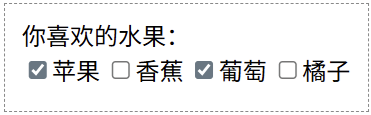
分析:
单选按钮与复选框就像好基友关系,很多地方都是相似的。我们多对比理解一下,这样更能加深印象。
HTML 复选框的 “忽略点”
对于单选按钮来说,name 属性相同表示 “互斥(只能选一个)”。而对于复选框来说,name 属性相同表示 “归类(这是同一组)”。
对于下面这段代码来说,如果 name 都不一样(比如 name="apple"、name="banana" 等),那么后端处理起来就会非常麻烦,因为每一个水果都是一个独立的变量。
<label><input type="checkbox" name="apple" value="苹果"/>苹果</label>
<label><input type="checkbox" name="banana" value="香蕉"/>香蕉</label>
<label><input type="checkbox" name="grape" value="葡萄"/>葡萄</label>
<label><input type="checkbox" name="orange" value="橘子"/>橘子</label>
如果我们把这一组复选框的 name 都设置为 "fruit",如下所示。此时如果用户选中了 “苹果” 和 “香蕉”,那么提交给后端的数据通常是这样的:fruit=apple&fruit=banana。然后后端接收到后会把它识别为一个数组:['apple', 'banana'],这样就非常方便后端高效处理数据。
<label><input type="checkbox" name="fruit" value="苹果"/>苹果</label>
<label><input type="checkbox" name="fruit" value="香蕉"/>香蕉</label>
<label><input type="checkbox" name="fruit" value="葡萄"/>葡萄</label>
<label><input type="checkbox" name="fruit" value="橘子"/>橘子</label>