



Seaborn 刻度范围函数
在 Seaborn 中,我们可以使用 set_xlim() 函数来定义 x 轴坐标的范围,也可以使用 set_ylim() 函数来定义 y 轴坐标的范围。
语法:
ax.set_xlim(left, right)
ax.set_ylim(left, right)
说明:
xlim() 和 ylim() 的取值范围为:[left, right],这个范围包括 left 也包括 right。
Seaborn 刻度范围示例
接下来,我们通过一个简单的例子来介绍一下 Seaborn 是如何设置刻度范围的。
示例:Seaborn 设置刻度范围
import pandas as pd
import matplotlib.pyplot as plt
import seaborn as sns

# 设置
sns.set_theme(rc={'font.sans-serif': 'SimHei', 'axes.unicode_minus': False})

# 数据
data = [
    ['2025-01-01', 36.0],
    ['2025-01-02', 36.1],
    ['2025-01-03', 36.6],
    ['2025-01-04', 36.2],
    ['2025-01-05', 36.4],
    ['2025-01-06', 36.5],
    ['2025-01-07', 36.0],
    ['2025-01-08', 36.2],
    ['2025-01-09', 36.4],
    ['2025-01-10', 36.8]
]
df = pd.DataFrame(data, columns=['日期', '体温'])
df.set_index('日期', inplace=True)
# 绘图
ax = sns.lineplot(data=df)

# 定义x轴刻度
dates = [str(i)+'日' for i in range(1, 11)]
# 先固定位置
ax.set_xticks(range(len(dates)))
# 再设置文字
ax.set_xticklabels(dates)

# 坐标轴范围
ax.set_ylim(35, 40)

# 显示
plt.show()
运行之后,效果如下图所示。
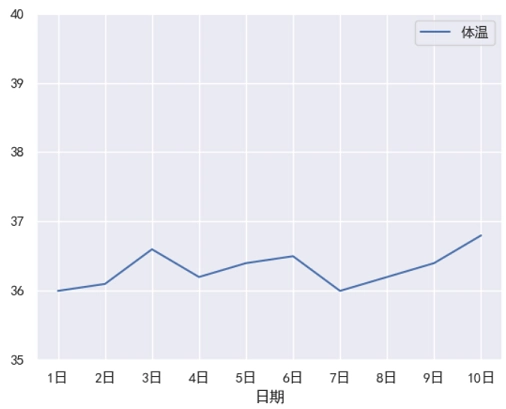
分析:
“刻度范围” 和 “刻度标签” 是不一样的,“刻度标签” 是一一对应到坐标轴上的。而 “刻度范围范围” 仅仅是定义一个范围,然后刻度是由 Matplotlib 自动调整的(Seaborn 基于 Matplotlib)。
